 Karim Jerbi
4f2cf5f516
Karim Jerbi
4f2cf5f516
Add a new #[cfg(test)] mod chprop_integration_tests to src/app/properties.rs
with four end-to-end tests that exercise the converted CHPROP / MATCHPROP
handlers through the real Message dispatcher and the CLI command driver:

- prop_color_change_multiple_entities_undo_redo: a colour change on two
  selected lines flows through Message::PropColorChanged -> the property-op
  handler -> apply_property_op, and is reversible via undo / redo. Seeds
  the panel's source_handles (selected_handles() is empty in this test
  setup) so the converted non-empty branch runs.

- prop_change_on_locked_layer_is_ignored: when a selected entity's layer
  is locked, property_target_handles filters it out and the handler's
  empty-handles branch leaves the entity itself untouched. Asserts the
  entity-level invariant only; the empty branch updates the document
  header (CECOLOR) and sets dirty as a separate, pre-existing behaviour.

- ribbon_lineweight_updates_after_change: the Home-ribbon Lineweight chip
  is updated by the converted RibbonLineweightChanged handler. Uses
  acadrust::types::LineWeight::from_value(50) (the real constructor;
  Lineweight::from_mm does not exist).

- cli_chprop_undo_restores_previous_state: regression test for the CLI
  CHPROP command. Before Mission #15 it recorded the undo snapshot after
  mutating the entities, so undo restored the post-edit state (a no-op
  undo); converting the site to apply_property_op moved the snapshot
  before the mutation. #[ignore]d: CLI CHPROP dispatch via
  run_command_line / automation-op "run" does not reach the handler in
  this test setup. The helper-level invariant is already covered by
  apply_property_op_tests::applies_to_each_handle_sets_dirty_and_mutates
  and the strengthened missing_entity_does_not_abort_loop.

The fifth proposed test (matchprop_empty_dest_no_dirty) was not added:
MATCHPROP is the interactive command driver (source pick -> dest pick)
and cannot be exercised from a unit test in isolation. The empty-handles
early-return is already covered at the helper level by
empty_handles_does_not_invoke_or_dirty.

Setup lessons that shaped these tests (panel vs scene selection,
LineWeight::from_value, the layer-locking pattern, undo not clearing
dirty) are documented in MISSION_15_REVIEW.md section 6.2.

Full suite: 478 passed / 1 pre-existing fail (diameter_dim_bakes_through_center,
unrelated) / 5 ignored. No regression. No production code changed -- the
new module is #[cfg(test)]-only.

test app::properties::chprop_integration_tests::prop_color_change_multiple_entities_undo_redo
test app::properties::chprop_integration_tests::cli_chprop_undo_restores_previous_state
test app::properties::chprop_integration_tests::prop_change_on_locked_layer_is_ignored
test app::properties::chprop_integration_tests::ribbon_lineweight_updates_after_change
English · Български · Português (Brasil) · Čeština · Nederlands · Français · Suomi · Deutsch · Magyar · Italiano · 日本語 · 한국어 · Polski · Русский · 简体中文 · Español · 繁體中文 · Türkçe · हिन्दी · العربية

Open CAD Studio
Open-source 2D drafting and 3D modeling for desktop and web, built with Rust.




Launch the web app · Download the desktop app · Join the discussion

Overview
Open CAD Studio is a cross-platform application for technical drawing, layout work, and solid modeling. It reads and writes DWG and DXF drawings natively, with a shared editing core across the desktop and browser versions.
The project is under active development. Keep backups of important production drawings and report reproducible problems through GitHub Issues.
Highlights
- Native drawing workflow — open, edit, recover, and save DWG and DXF files without a conversion service.
- Precise 2D drafting — lines, polylines, curves, splines, hatches, object snaps, tracking, layers, blocks, and external references.
- Documentation tools — text, dimensions, leaders, tolerances, tables, model space, paper space, viewports, and plot styles.
- Kernel-backed 3D modeling — solid primitives, extrusion, revolution, sweep, loft, Boolean operations, and ACIS entity tessellation.
- GPU rendering — accelerated 2D and 3D viewports through
wgpu, with orthographic and perspective cameras. - Extensible workflows — native plugins, command scripts, headless conversion, and a line-based JSON automation API.

File workflows
| Format or workflow | Support |
|---|---|
| DWG | Read and write; versioned save targets from R14 through 2018 |
| DXF | Read and write; versioned save targets from R14 through 2018 |
| BAK / SV$ | Open drawing backups and autosave files |
| OBJ | Import polygon meshes |
| LandXML | Import CgPoint survey points |
| STL | Export 3D mesh data |
| STEP AP203 | Export 3D mesh data |
| Plot layouts and selected geometry on desktop | |
| CSV | Extract entity property data |
| CTB / STB | Load and edit plot style tables |
Desktop or web
Use the web app for immediate access with no installation. Drawings are selected through the browser and saved as local downloads.
Use the desktop application for native file associations, file-manager thumbnails, system printing, PDF output, external plugins, command scripts, and headless automation. Release builds are available for Windows, Linux, and Apple Silicon macOS.
Install
Download all current packages from the latest release.
Windows
Choose one of these signed x86-64 packages:
OpenCADStudio-*-windows-x86_64-installer.msi— recommended installer with Start Menu shortcuts, DWG/DXF file associations, and drawing thumbnails.OpenCADStudio-*-windows-x86_64-portable.exe— standalone application; no installation required.
Linux
Download the x86-64 AppImage, make it executable, and run it:
chmod +x OpenCADStudio-*-linux-x86_64.AppImage
./OpenCADStudio-*-linux-x86_64.AppImage
macOS
The published macOS package supports Apple Silicon:
- Download
OpenCADStudio-*-macos-arm64.dmg. - Open the image and drag
OpenCADStudio.appinto Applications. - If Gatekeeper blocks the first launch, approve the app from System Settings → Privacy & Security.
The application is ad-hoc signed but is not currently notarized by Apple.
Languages
Open CAD Studio can follow the system language or use any of these 20 interface languages:
Arabic · Brazilian Portuguese · Bulgarian · Czech · Dutch · English · Finnish · French · German · Hindi · Hungarian · Italian · Japanese · Korean · Polish · Russian · Simplified Chinese · Spanish · Traditional Chinese · Turkish
Change the language from the application settings. The browser version also uses the browser's preferred locale when System is selected.
Build from source
Desktop
Requirements:
- Git
- Current stable Rust toolchain
- Platform graphics and font development libraries
On Ubuntu or Debian, install the native dependencies with:
sudo apt update
sudo apt install libgl1-mesa-dev libx11-dev libxcursor-dev libxi-dev \
  libxrandr-dev libxkbcommon-dev libwayland-dev libfontconfig1-dev \
  libfreetype6-dev
Then build and run:
git clone https://github.com/HakanSeven12/OpenCADStudio.git
cd OpenCADStudio
cargo build --release --bin OpenCADStudio
The resulting binary is written to target/release/OpenCADStudio (OpenCADStudio.exe on Windows).
Web
Install the WebAssembly target and build tools once:
rustup target add wasm32-unknown-unknown
cargo install trunk wasm-bindgen-cli
Start the development server:
trunk serve
Automation
The desktop binary supports one-shot conversion and a persistent headless server:
OpenCADStudio --export input.dwg output.dxf
OpenCADStudio --serve
OpenCADStudio --serve --port 4242
The server exchanges one JSON object per line over standard input/output or a local TCP socket. See the automation guide and the included Python client.
Plugins
Desktop plugins run in separate processes and communicate with the host through the versioned plugin API. The browser build does not load native plugins.
Project documentation
Contributing
Bug reports, focused pull requests, translations, documentation improvements, and plugin contributions are welcome.
- Search existing issues before opening a new report.
- Use Discussions for questions and ideas.
- Report vulnerabilities privately by following the security policy.
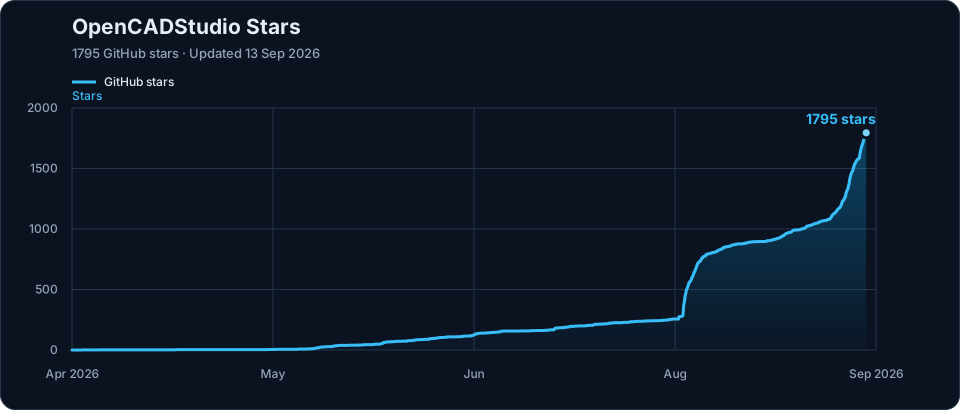
Project growth
Support the project
If Open CAD Studio helps your work, support continued development through GitHub Sponsors or Patreon.
License
Open CAD Studio is distributed under the GNU General Public License v3.0.